

 The level-3 dynamic-page not only demonstrates the real-time execution of the
codes. In most of the cases, if the progress of the codes can be temporarily
suspended, student will be able to study the outcome for each suspension and
compare the result with the source code.
The suspension can be done by clicking the mouse button on the applet area
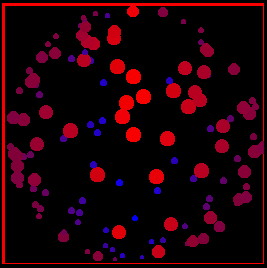
of the screen. For example, Figure java5 demonstrates
a rotating 3-D sphere representing by some randomly created oval dots with different
sizes, colors and phases. As the student suspends the screen temporarily,
he can have a better view of the details, and then resume the execution
as he wants.
The level-3 dynamic-page not only demonstrates the real-time execution of the
codes. In most of the cases, if the progress of the codes can be temporarily
suspended, student will be able to study the outcome for each suspension and
compare the result with the source code.
The suspension can be done by clicking the mouse button on the applet area
of the screen. For example, Figure java5 demonstrates
a rotating 3-D sphere representing by some randomly created oval dots with different
sizes, colors and phases. As the student suspends the screen temporarily,
he can have a better view of the details, and then resume the execution
as he wants.
 |
|
|