Common Visual Interface in QBE
Tabular, form based:
In tabular or form based QBE, user puts values in tables or form to formulate their query.
Fig 1a. Examples of tabular QBE
| Sailors |
sid |
sname |
rating |
age |
| P. |
|
|
10 |
|
Fig 1b. Example of a form-based QBE

Graph based:
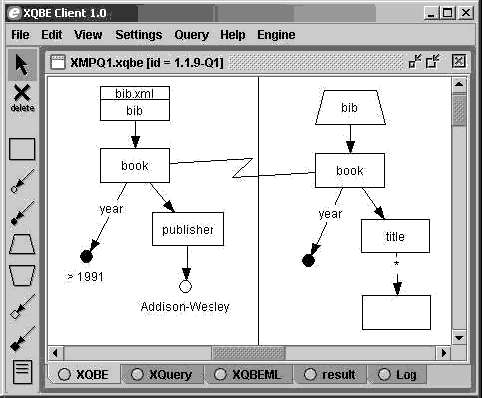
In graph based QBE, user typically have a canvas window and a toolbar in which user can construct a query graph.
Fig 2. Example of graph-based QBE
Symbolic Image, Sketch Based:
In symbolic image based QUE, user can drag and drop symbolic images onto a canvas to formulate their query. In sketch based QUE, user can use drawing tools provided by the program to sketch the query he or she wants.
Fig 3. Example of symbolicimage and sketch based QBE

Object Based:
In object based QUE, user uploads an exmple image, audio, or video to the system in which features are extracted from the uploaded media to find object similar to the media.
|

