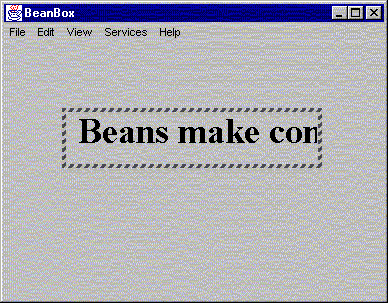
Here is the source code for TextScrollBean2.java:
import java.awt.event.*;
import java.awt.Graphics;
import java.awt.*;
import java.beans.*;

public class TextScrollBean2 extends Panel implements java.io.Serializable,
  Runnable {

	String text = null;
	transient Thread kicker = null;
	int speed=10;
	int x = 0;
	int y = 30;
	int stringwidth;
	int width = 250;
	int height = 50;
	FontMetrics fm;
	// Offscreen graphics context and image to implement double buffering
	transient Image offscreen;
	transient Graphics goffscreen;
	// Declare and instantiate a PropertyChange object
	private PropertyChangeSupport changes =
		new PropertyChangeSupport(this);
	private VetoableChangeSupport vetos =
		new VetoableChangeSupport(this);


	public TextScrollBean2() {
    		text = "Beans make components easy";
		setFont(new Font("TimesRoman",Font.BOLD,36));

		start();
	}


	public Dimension getPreferredSize() {
		return (new Dimension(width, height));
	}

	public String getTextString() {
		return text;
	}

	public void setTextString(String newtext) {
		text = newtext;
	}

	public int getSpeed() {
		return speed;
	}

	public void setSpeed(int newSpeed) throws PropertyVetoException {
		// tell vetoers about the change
		vetos.fireVetoableChange("Speed", "" + speed, "" + newSpeed);

		// Send change event to listeners when
		// speed is changed
		changes.firePropertyChange("Speed", "" + speed, "" + newSpeed);
		speed = newSpeed;
	}

	// Add a listener.  This will get called by the BeanBox
	public void addPropertyChangeListener(PropertyChangeListener l) {
		changes.addPropertyChangeListener(l);
	}

	// Remove a listener.  This will get called by the BeanBox
	public void removePropertyChangeListener(PropertyChangeListener l) {
		changes.removePropertyChangeListener(l);
	}

	// Add a veto listener.  This will get called by the BeanBox
	public void addVetoableChangeListener(VetoableChangeListener l) {
		vetos.addVetoableChangeListener(l);
	}

	// Remove a veto listener.  This will get called by the BeanBox
	public void removeVetoableChangeListener(VetoableChangeListener l) {
		vetos.removeVetoableChangeListener(l);
	}


	// This method can be used to connect a Button to the
	// TextScrollBean.startScrolling method
	public void startScrolling(ActionEvent ex) {
		kicker.resume();
	}

	// This method can be used to connect a Button to the
	// TextScrollBean.stopScrolling method
	public void stopScrolling(ActionEvent ex) {
		kicker.suspend();
	}

	public void start() {
		if(kicker == null) {
        		kicker = new Thread(this);
        		kicker.start();
		}
 	}

	public void stop() {
		kicker = null;
 	}

	public void run() {
		while (kicker != null) {
			try {
				Thread.sleep(speed);
			} catch (InterruptedException e) {
				e.printStackTrace();
			}
			repaint();
		}
	kicker = null;
 	}

	public void paint(Graphics g) {
		update(g);
	}

	public void update(Graphics g) {
		fm = g.getFontMetrics();
		stringwidth = fm.stringWidth(text);

		// Added double buffering to eliminate flashing
		// Create an offscreen graphics context
		if (goffscreen == null) {
			offscreen = createImage(width,height);
			goffscreen = offscreen.getGraphics();
		}
		// Paint to our offscreeen graphics context
		goffscreen.setColor(getBackground());
		goffscreen.fillRect(0,0,width,height);
		goffscreen.setColor(getForeground());
		goffscreen.drawString(text, x, y);


		// Paint our offscreen image to the screen
		g.drawImage(offscreen,0,0,this);


		if (x <= (-stringwidth)) {
			x=width;
		} else {
			x--;
		}
	}
}
|
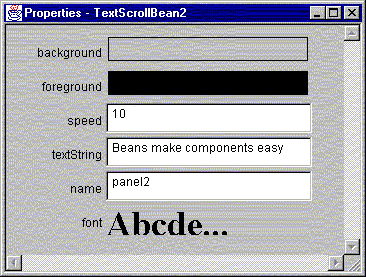
In addition to what TextScrollBean1 does to act as a source of design-time events, TextScrollBean2 adds two properties: speed and text. Notice the fields, setter methods, and getter methods.
You should be able to package TextScrollBean2 into a bean. On the next page we will add a bit more to
TextScrollBeans2 and rename it as TextScrollBean - Hoque's full blown bean example. But first, look
at the properties of TextScrollBean2 in the beanbox. Notice the two properties in addition to
those of Panel and TextScrollBean1.