
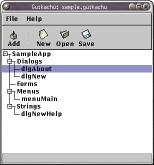
Export to RCP... command from the File
menu to create the RCP file that can then be compiled and linked
into a PRC file.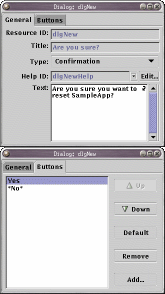
^ marks (^1,
^2 and ^3) in the text, which you can replace
with some other string (if using ^'s, be sure to pass
enough valid replacement strings to FrmCustomAlert,
or it may segfault)
Word response1, response2; response1 = FrmAlert (dialog_id); if (response1 == 0) response2 = FrmCustomAlert (other_dialog_id, "You clicked OK", "Replacement Text 2", 0); else response2 = FrmCustomAlert (other_dialog_id, "You clicked Cancel", "Replacement Text 2", 0); |
The return value of FrmAlert is the index of the button pressed
(starting from 0). Note: If the user switches to
a different application while the dialog is shown, the function
returns with the default button number.
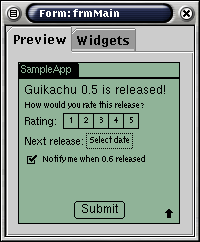
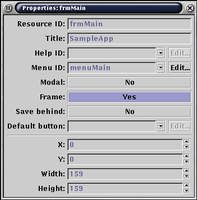
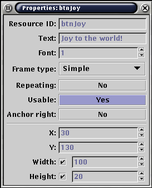
"FORM" is the PalmOS term for windows. A form represents a rectangular area on the screen that can hold an arbitary number of widgets. The maximum size of a form is 160 pixels high by 160 pixels wide: this is the same as the size of the Palm screen itself.
Guikachu aids your form design process with a preview window showing a close approximation of what the form will actually look like on a PalmOS-based computer. Please note that due to technical reasons, it is not possible to make this preview feature pixel-perfect. Be sure to always check your final form designs on an actual PalmOS computer.
You can attach a menu bar and a help string to a form (the help button is only displayed for modal forms).
You can also use a form as a modal dialog via the
FrmDoDialog function. This works just like
FrmAlert and will block your application until a button
is pressed on the form. The return value of the function will be the
ID of the button pressed (or the default button's ID if the form is
closed by switching to another application).
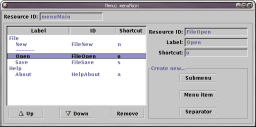
A MENU resource describes a full menu bar (one level deep submenus
plus menu items) that can be attached to a window. All the menu
items have unique ID's, which you can query for in the parent form's
menuEvent handler. You can also assign shortcut
letters to the menu items, which can be accessed with the
shortcut (/) graffiti sign.
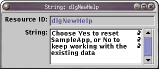
A STRING resource contains a single string, which you can easily access from your application:
Char *msg = MemHandleLock (DmGetResource (strRsc, string_id)); /* Do something with the string */ MemPtrUnlock (msg); |
String resources are also used as help texts associated with dialogs.
